Overview
Quickly and efficiently follow up all outstanding fees with reminders sent only to outstanding families.
Setup Guide
TABLE OF CONTENTS
Before You Start
This module uses the "Account Overdue" Email / SMS System Notification message template.
Note: The %%BALANCE%% merge field will only populate the family's account balance when used with the Outstanding Fees module. It cannot be copied into a custom message template.The content of the message can be checked / edited from Administration → Edit Message Templates and click on edit for the message template type for the Account Overdue notification. Refer to: How To: Create or Edit a Message Template
How to send outstanding fee reminders
1. Go to Administration → Outstanding Fees.
2. Change the fields / check boxes if needed and click "Show Balances".
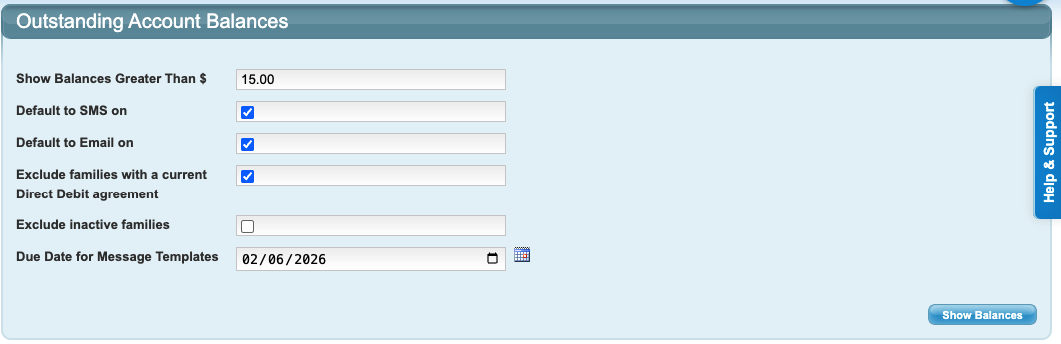
We recommend to keep the box ticked to EXCLUDE families with a current Direct Debit Agreement as their balances will be covered by their direct debit.3. All families with balances higher that the amount entered will be displayed on the next screen, and the date their last payment was receipted (no receipted payment will show as 01/01/1970). Untick any boxes for any families you do not want to send reminders.
4. Tick any boxes for any inactive families you want to send reminders.
5. Click "Send Reminders" at the bottom of the list.
Last updated 2 June 2026
Was this article helpful?
That’s Great!
Thank you for your feedback
Sorry! We couldn't be helpful
Thank you for your feedback
Feedback sent
We appreciate your effort and will try to fix the article