Overview
This article shows you how to archive duplicate family records.
How-To Video
Setup Guide
TABLE OF CONTENTS
Before You Start
End any current enrolments (leave boxes ticked to credit back and remove future attendances and finance).
How to Archive a Duplicate Family
From the FAMILY to be archived:
- Click on "Edit Name & Address".
- Rename the family, e.g. Duplicate Family, Archived Family.
- Remove the Contact details from the family and click "Update".
- After archiving the Students (see below), ensure the family account balance is not in debit.
From the STUDENT to be archived:
- Ensure no current enrolments. End them if there are any.
- Rename the Student, e.g. Duplicate / Archived.
- Click "Update Student Information".
- Repeat for each Student in the family.
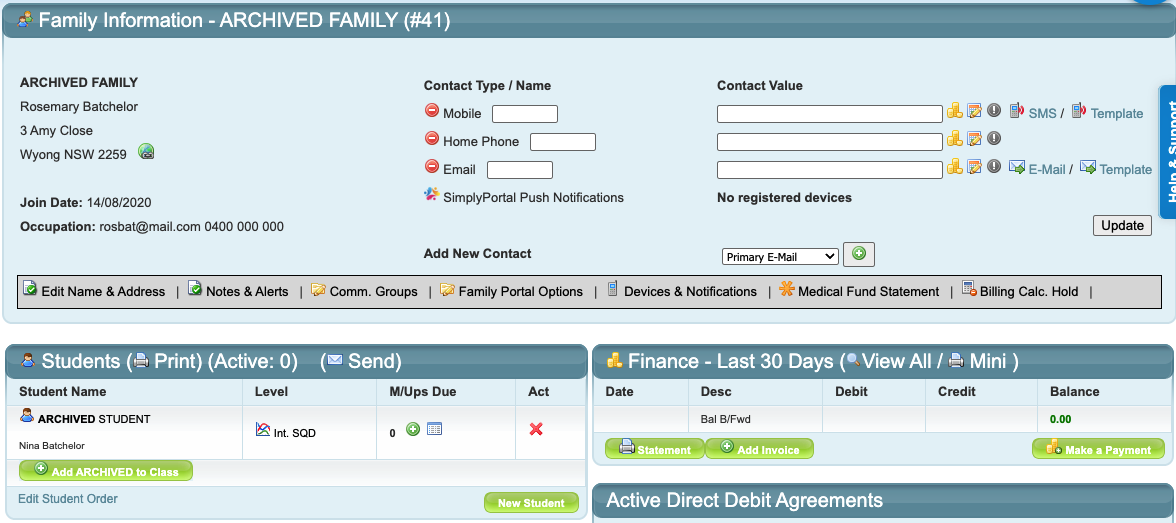
Duplicate family records prevent families accessing the SimplyPortal customer app. They need to be archived so the active family can access their portal, and so there is no confusion of enrolments or finance.Example of an archived family:
Last updated 11 May 2026
Was this article helpful?
That’s Great!
Thank you for your feedback
Sorry! We couldn't be helpful
Thank you for your feedback
Feedback sent
We appreciate your effort and will try to fix the article