Overview
This article guides you through the simple process of manually adding a new family to your database.
To convert a family from an Enquiry, refer to: How To: Convert an Enquiry to a Family Record
Setup Guide
TABLE OF CONTENTS
Before You Start
Run a search in your Quick Search Bar of the family email address or phone number (tick "Search by Contact Value") to ensure they are not already in your database.
How To Create a Family Record in your Database
1. Go to the Families screen and click "Add Family".
2. Enter the Family Contact Name / Parent Name, Mobile phone number and Email Address as a minimum and click "Add Family".
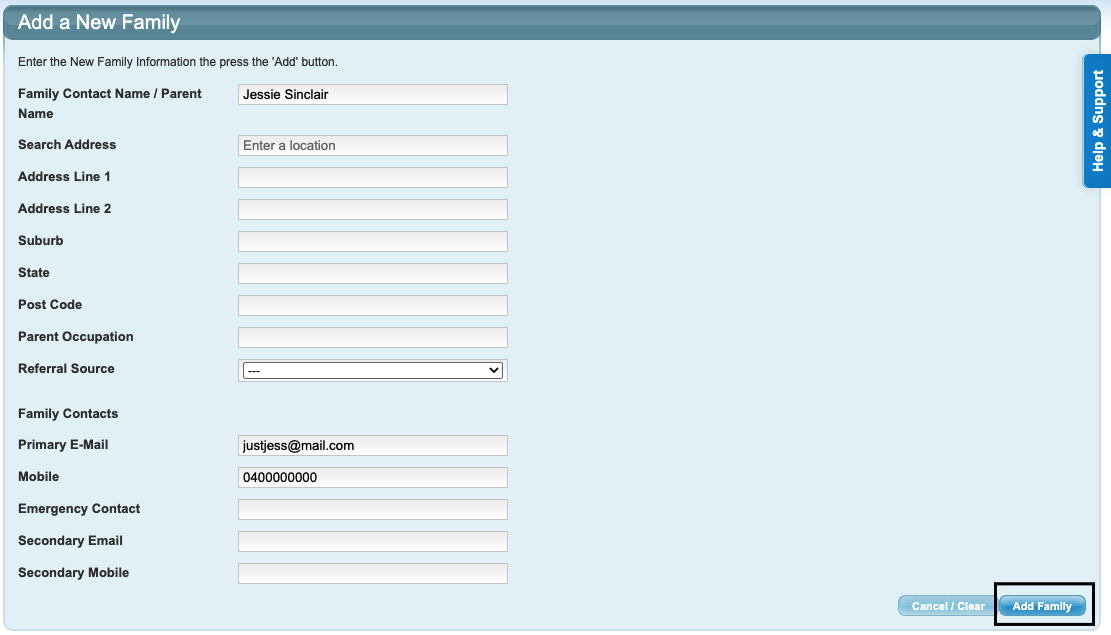
3. Click on "New Student".

4. Enter the Student's details and click "Add Student to Family".
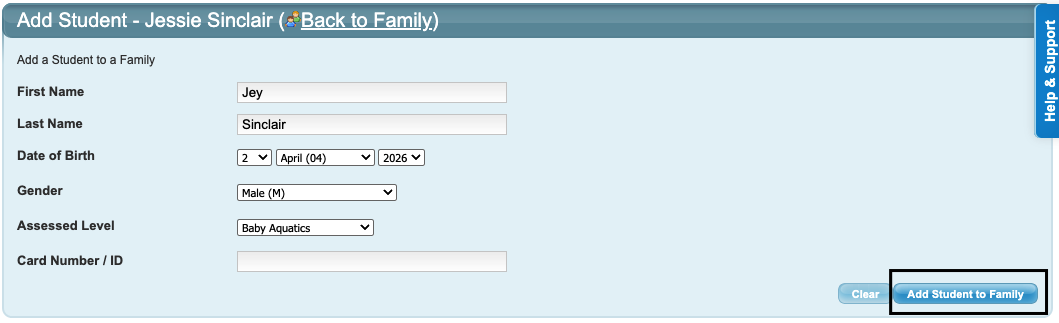
5. Repeat for each student.
Next steps article links
Students are now ready to be enrolled into classes. From the Family record click "Add <Student Name> to Class" or from the Student record click "New Class Enrolment". Refer to:
How To: Enrol a Student into a Class
Last updated 22 October 2026
Was this article helpful?
That’s Great!
Thank you for your feedback
Sorry! We couldn't be helpful
Thank you for your feedback
Feedback sent
We appreciate your effort and will try to fix the article