Overview
This article explains how to convert an Enquiry into a Family in your database.
How To Video
Setup Guide
TABLE OF CONTENTS
Before You Start
Check if the family already exists in your database. If they have used the same email address or phone number in their Enquiry, a red warning will appear on the Enquiry.
How To: Convert an Enquiry into a Family
1. Go to Enquiries and click on the magnifying glass symbol next to the enquiry to be converted.
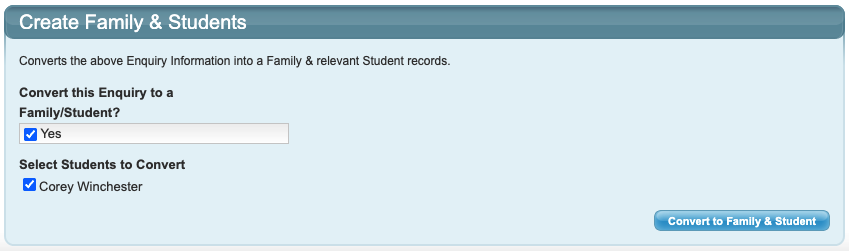
2. Scroll to the bottom of the Enquiry and tick the box "Yes" for "Convert this Enquiry to a Family/Student?".
3. Leave the boxes ticked for the students to be converted into the family.
NOTE: If the same student has been duplicated by the family, untick the box for the duplicate student so they are not carried over.
4. Click "Convert to Family & Student".
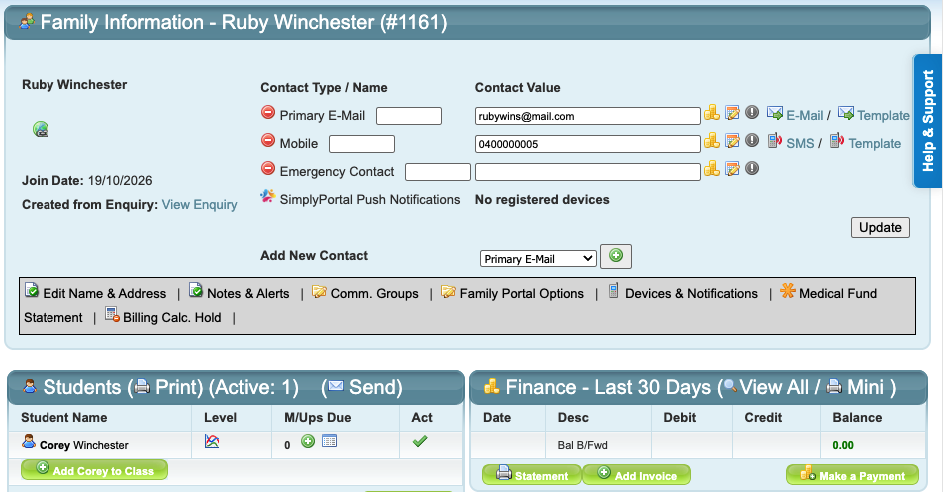
The family is now converted with the information they entered in the enquiry. Their students are ready to be enrolled.
Next steps and related article links
You will need to enrol the students into their classes: How To: Enrol a Student into a Class
Last updated 22 October 2026
Was this article helpful?
That’s Great!
Thank you for your feedback
Sorry! We couldn't be helpful
Thank you for your feedback
Feedback sent
We appreciate your effort and will try to fix the article