 Sales Complete Elite
For an overview on Mandatory Direct Debit Agreements, refer to: Mandatory Direct Debit Agreements: Overview
Direct Debit must be configured in your site. If you do not have but would like to add this as a payment option, you will need to set up an account with our third party payment provider. Contact Support for assistance.
To setup / edit your Mandatory Direct Debit Agreement settings, refer to the below setup guide.
Setup Guide
Mandatory Direct Debit needs to be configured in two places from Configuration:
- Level settings - this is so that you can include / exclude levels from the mandatory agreement requirement
- Global setting to enable the automatic alerts.
Level Settings
The first setting allows you to select the Class Assessment Levels that the mandatory direct debit agreement is required for (e.g. you may not require a mandatory agreement for an Assessment level but you do for all other levels).
1. Go to your Class Assessment Levels and click on the level name.
2. Tick the box "Require a Direct Debit Agreement".
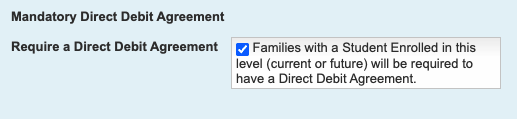
3. Click on "Modify Level" to save the setting.
4. Repeat this for each level required.
Global Setting - Enable alerts
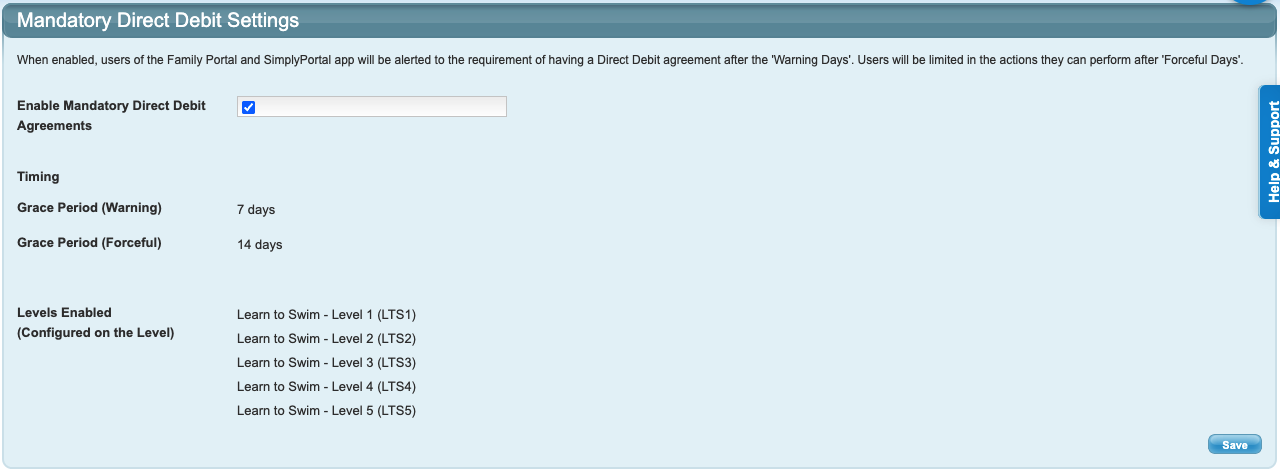
This needs to be ticked to enable the Mandatory Direct Debit alerts for families and only needs to be actioned once. This screen shows you the levels that have been enabled and the number of days configured for the alerts.
1. Go to Configuration and click on Mandatory Direct Debit Agreement under the 'Financial' heading.
2. Tick the box Enable Mandatory Direct Debit Agreements.
3. Click Save.
Alert Content
The content of the alerts are pre-configured but the wording can be edited if required. To edit the alert content, go to Configuration and click on Language & Labels.
To update the wording for each warning, type in the updated text next to the corresponding alert and then scroll to the bottom of the screen and click Save Label / Text Values. Any text entered into the field will override the preconfigured text.

Alert 1: Information
The first alert is a friendly blue reminder with a simple "You are required to maintain an active Direct Debit Agreement". This is the FORCEDIRECTDEBIT_INFO_TEXT field.

Alert 2: Warning
The second alert is a yellow warning with the same simple reminder prompt "You are required to maintain an active Direct Debit Agreement". This is the FORCEDIRECTDEBIT_WARN_TEXT field.

Alert 3: Enforcement
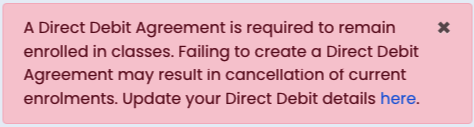
The third warning is a red "An active Direct Debit Agreement is required to remain enrolled in classes. Failing to create or maintain an Direct Debit Agreement may result in cancellation of current enrolments." This is the FORCEDIRECTDEBIT_FORCE_TEXT field.
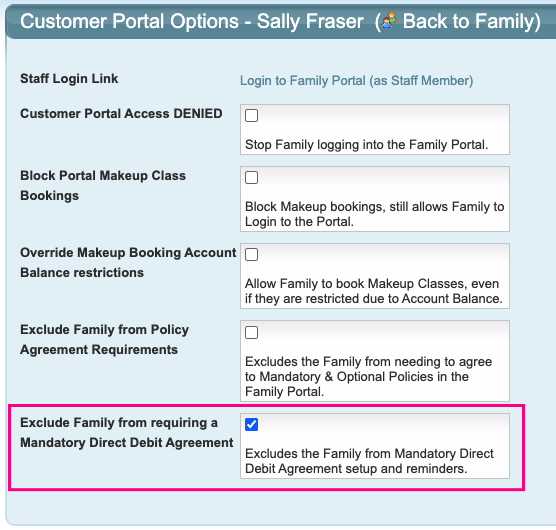
Can a family be excluded from requiring a Mandatory Direct Debit Agreement?
Yes.
From their family screen, click on "Family Portal Options" and then tick the box "Exclude Family from requiring a Mandatory Direct Debit Agreement" and save.
Last updated 2 March 2026
Was this article helpful?
That’s Great!
Thank you for your feedback
Sorry! We couldn't be helpful
Thank you for your feedback
Feedback sent
We appreciate your effort and will try to fix the article