Overview
Make-up bookings match the level of the student. However, levels can be grouped together so that make-ups can be booked across multiple levels. Use this article to create Class Assessment Level Groups.
Setup Guide
TABLE OF CONTENTS
Before You Start
Be aware that a student can book into any class level within the group, so think carefully about your groupings.
For example, if you allow a Level 2 Student to book into a Level 1, Level 2 or Level 3 class, create two separate groupings:
Group 1: Level 1 and Level 2
Group 2: Level 2 and Level 3
If all three levels are put into the one group, you could have a Level 1 booking into a Level 3 class and vice versa.
How to CREATE a Class Assessment Level Group
1. Go to Configuration → Class Assessment Level Groups and click "Add Class Assessment Level Group".
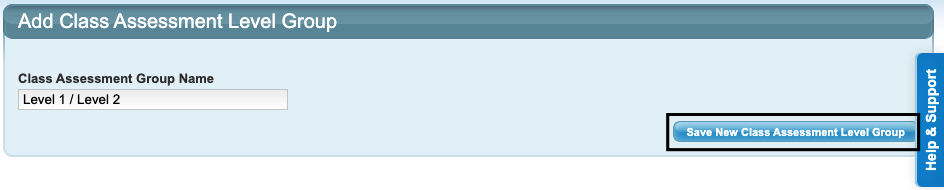
2. Name your group and click "Save New Class Assessment Level Group".
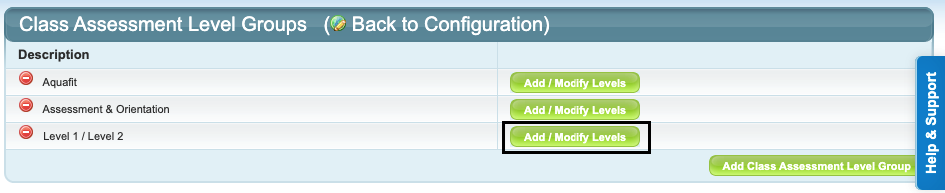
3. Click "Add / Modify Levels".
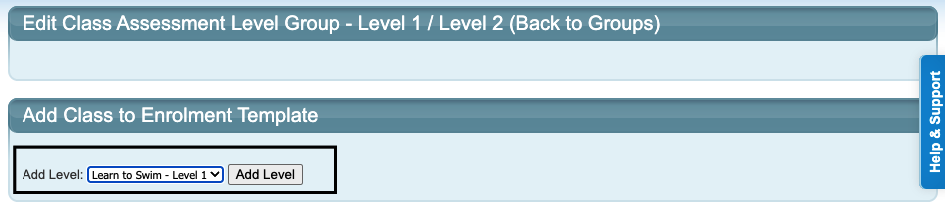
4. Select the first level to add into the group from the dropdown and click "Add Level".
5. Repeat to add the next level into the group.
Remember: Any Level included in the group will be able to book into any other level included in the group.Repeat to make as many groups as required.How to MODIFY a Class Assessment Level Group
Note: The name of the group cannot be edited. You would need to delete the group and create it again.
1. Go to Configuration → Class Assessment Level Groups and click "Add / Modify Levels".
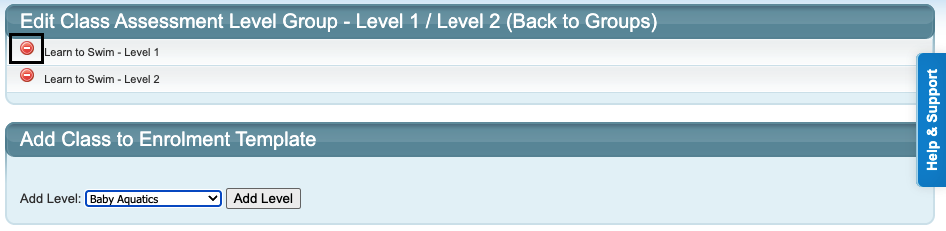
2. From here you can click on the red circle to delete an added level, or use the dropdown to add further levels.
How to DELETE a Class Assessment Level Group
1. Go to Configuration → Class Assessment Level Groups and click on the red circle next to the group name.
2. Click "OK" to confirm.
Last updated 3 July 2026
Was this article helpful?
That’s Great!
Thank you for your feedback
Sorry! We couldn't be helpful
Thank you for your feedback
Feedback sent
We appreciate your effort and will try to fix the article