Overview
Non-Attendance Messages are used for and linked to automatic Non-Attendance Notifications.
These notifications trigger when specific Non-Attendance reasons are used from the Attendance screen (e.g. Not Notified), based on your Non-Attendance Notification Setup. A task can be configured for staff to follow up.
Setup Guide
TABLE OF CONTENTS
Before You Start
Go to Configuration → Non-Attendance Messages to view any configured messages. Click on "Edit" to view / edit the content. Refer to the below instructions to create messages.
Multiple Non-Attendance messages and notifications can be configured for use in different scenarios.

Non-Attendance Notifications are intended for absences that were not notified or missed first lessons.
How to: Create automatic Non-Attendance Messages
1. Go to Configuration → Non-Attendance Messages and click "Add Custom Message".
2. Complete all fields and click "Add Custom Message". See below for further detail on each field.
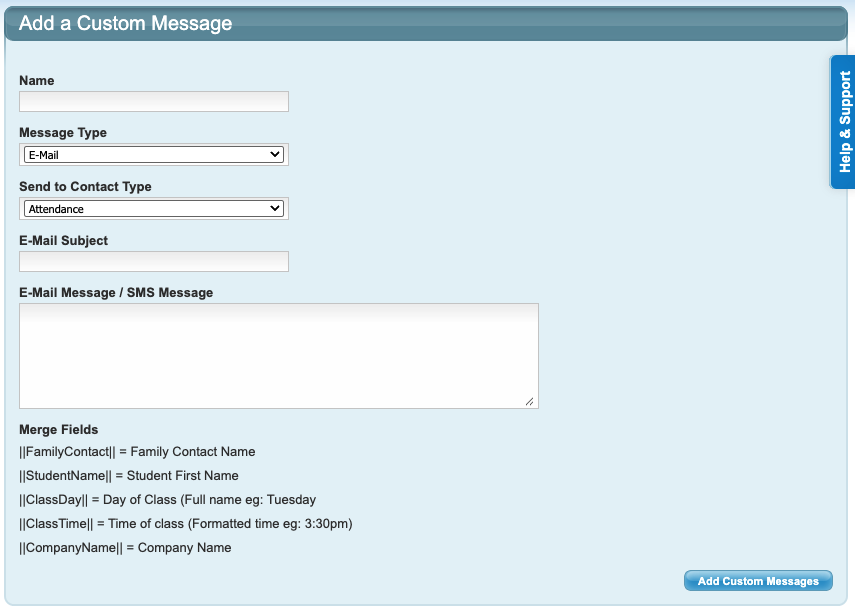
Field Name | Field response |
Name | Name the non-attendance message. Tip: Match the corresponding notification name, e.g. "Missed - 1st - SMS". |
Message Type | Select either SMS or Email. Recommendation: SMS is a more immediate communication. |
Send to Contact Type | Select the recipient - Attendance Contact or Billing Contact. |
E-Mail Subject | This must be completed if the Message Type is Email. |
E-Mail Message / SMS Message | Enter the content of the message. |
Repeat the above steps for each message. Next Step
The next (and final) step is to link these messages to an automatic Notification found at Configuration → Non-Attendance Notification Setup.
This next step is important. The messages will not send without completing the Non-Attendance Notification Setup.
Refer to this article: How To: Setup Non-Attendance NotificationsExamples of Non-Attendance Message Content
We recommend softer language / gentle reminders for the first / second messages. The third message could be firmer in content.
SMS is recommended as it is a more immediate, upfront communication and less likely to be ignored or end up in Spam. See attached examples.
Last updated 5 June 2026
Was this article helpful?
That’s Great!
Thank you for your feedback
Sorry! We couldn't be helpful
Thank you for your feedback
Feedback sent
We appreciate your effort and will try to fix the article