Overview
This guides assists with updating Price Levels (lesson pricing).
It does not relate to Membership price changes or individual Special Prices.
Setup Guide
TABLE OF CONTENTS
Before You Start
Plan ahead. Pricing needs to be updated before generating invoicing.
How to Update Price Levels
1. Go to Configuration → Price Level.
2. Click on the name (Description) of the Price Level. Update the "Default Per Class Amount" and click "Save Changes".
**This step only needs to be completed if discounting is used.**
3. Click on "Edit Price Matrix" and update the pricing in each field. Save changes.
Note: A blank field will charge the Default price amount. An amount of -1.00 = no charge (free).
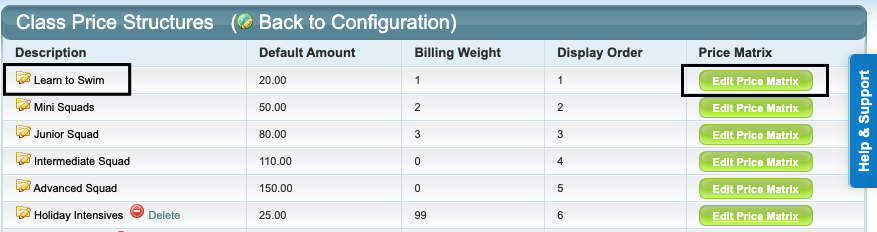
Repeat for each Price Level required. When to Update Price Levels
Pricing needs to be updated before generating invoices.
The new price level becomes effective as soon as it is updated. Make the change as close to generating invoices as possible. No changes will occur to already billed enrolments. Any new enrolments will be billed at the new price levels.
FAQS / Tips / Reminders
Do new Price Levels need to be created each time pricing changes?
No. Best practice is to edit your existing Price Levels. Only add a new Price Level if a new one is needed.
Why? Because Classes and Enrolments are linked to the existing Price Levels. Creating new Price Levels would require editing existing classes and/or price overrides on enrolments to link to the new pricing.
Will everyone's prices automatically be updated?
Yes, if the Price Levels are updated before generating invoicing.
How do I update Special Pricing?
Special Pricing is individually applied to a Student and cannot be updated in bulk. Go to the Student's screen and click on "Edit" next to their enrolment. Update the Special Price and save changes before generating invoicing.
Will any already invoiced amounts be changed?
No. Any amounts already invoiced will not be affected or changed.
If a student's enrolment is changed after the pricing has been updated, any remaining lessons would be credited back at the amount they were originally invoiced.
Will price changes impact direct debit?
No. The price change is seamless. Amounts invoiced dictate the direct debit; existing invoices will not be impacted or changed.
Last updated 22 June 2026
Was this article helpful?
That’s Great!
Thank you for your feedback
Sorry! We couldn't be helpful
Thank you for your feedback
Feedback sent
We appreciate your effort and will try to fix the article