Overview
There are two avenues for assistance:
- searching our knowledge base which contains guidance and instructions on all aspects of the system
- contacting our Support team.
Table of Contents
How to Search Help Articles
A wealth of knowledge is at your fingertips at all times. Our knowledge base articles provide concise, step-by-step instructions or information.
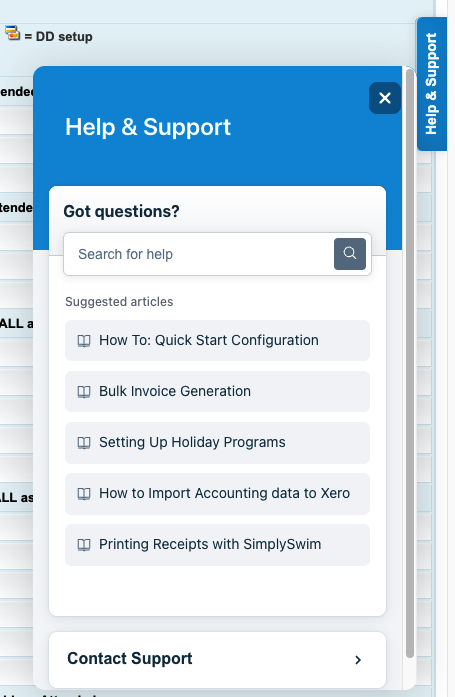
1. Click on the blue "Help & Support" widget on the right hand side of your screen.
2. Search the topic you need guidance on and hit enter or click on the magnifying glass.
3. Click on the support article to view instructions.
How to Contact Support
Create a Support Ticket
1. Click on the blue "Help & Support" widget on the right hand side of your screen and click "Contact Support".
2. Provide a specific Subject. This is what your query is about / what you require assistance with. For example:
Family ID 145 Hayes - Direct Debit
3. Enter your query in the Description box.
IMPORTANT: Please include as much detail as possible so the Support Team can investigate and get back to you promptly. Include:
- what your question is / what appears incorrect
- Family name and ID,
- Student name,
- specific details on your query (e.g. enrolment details, account specifics, class details, examples, error messages)
- anything you have checked.
3. Remember to sign off with your name as we love to know who we are communicating with.
4. Click "Take a Screenshot" if a screenshot is relevant.
5. Click on "Create Support Case".
You will receive an email with your case/ticket number which allows you to track the progress of your query or reference it at a later date.
Support replies will return to the User email / the Centre email, depending on the User settings.
Multiple examples on the same issue can be included on the same ticket.

Send in separate tickets for multiple questions on different topics. This is so that you can track your different queries more easily, but also there may be times where one query can be rectified and another may require further investigation or escalation to a different team member.
Send an Email
Send an email to support@simplyswim.com.au including:
1. A Subject. This is what your query is about / what you require assistance with. For example:
Family ID 145 Hayes - Direct Debit
2. Detail on your query.
IMPORTANT: Please include as much detail as possible so we can investigate and get back to you promptly. Include things like:
- what your questions is / what appears incorrect
- Family name and ID,
- Student name,
- specific details on your query (e.g. enrolment details, account specifics, class details, examples, error messages)
- anything you have checked
- screenshots if applicable.
3. Remember to sign off with your name as we love to know who we are communicating with.
Contact by Telephone
Call 1300 017 946 and press 1 to speak with our Support Team.
When leaving a voicemail, provide as much detail as possible so that the appropriate team can investigate and respond.
Telephone queries may not be answered immediately depending on the complexity of the query. Details and examples would be noted and a support ticket created (as above) and your query placed in the support queue.Support Ticket Priority Levels
All tickets are responded to promptly by our Support team. We understand that all queries are a priority, however we do have different priority levels based on impact of service.
Most queries would be set to Low or Medium priority (e.g. family account queries, direct debit / finance queries, "how to" guidance, billing questions or mistakes).
High priority relates to intermittent issues / reduced quality of service / impact of service with major functions such as Direct Debit or SMS where no workaround is available.
Urgent priority relates to a complete loss of service or a significant feature that is completely unavailable and no workaround is available.
Refer to: Support ticket priority levels explained
Last updated 5 June 2026
Was this article helpful?
That’s Great!
Thank you for your feedback
Sorry! We couldn't be helpful
Thank you for your feedback
Feedback sent
We appreciate your effort and will try to fix the article