Overview
This article guides you through common troubleshooting questions with Communication Campaigns.
Setup Guide
TABLE OF CONTENTS
Red Text Errors / Send Options Not Displaying
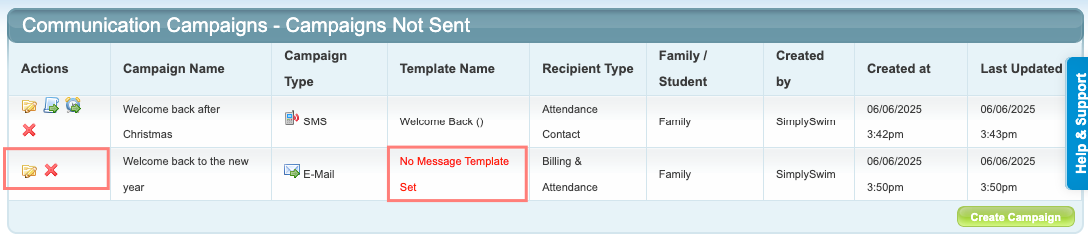
If no Message Template is selected, or if an Email Message Template does not have a Subject, the send options will not be available. Any error will display in red text to alert you of the error.
EXAMPLES:
Error: (Email Subject not set)
Solution: Go to Administration → Edit Message Templates and enter an Email Subject for the message template.

Error: No Message Template Set
Solution: Click on the yellow edit folder for the campaign → select a message template from the dropdown → click "Save Campaign Content".
No Recipients are displaying on the list
Check the Campaign Conditions to make sure they are correct and nothing contradictory is in place.
Remember there is an imaginary "and" between each condition. Recipients need to meet every single condition to be included in the campaign.
Example:
You want to send a campaign to Students who have classes on a Monday OR Friday. Add the Day of Week condition and select both days, do not add the condition twice.
Example:
You want to send a campaign to certain Memberships. They have no enrolments. Remove the Family, Student and Enrolment Status standard conditions and add in the Membership condition.
Campaign Summary showing no messages sent
The Campaign Summary section on a sent campaign is only relevant for Email campaigns. It does not display any information for an SMS or Push Notification campaign.
All messages are queued to be sent. The summary will not populate immediately. Go to Administration and check the relevant message logs for confirmation of sending.

Tips for successful campaigns
- Always check the recipient list before sending to ensure your message is going where it is intended.
- Select the right conditions for each message.
- Ensure both the Campaign Content (top section) and Campaign Conditions (bottom section) are saved.
Last updated 23 June 2026
Was this article helpful?
That’s Great!
Thank you for your feedback
Sorry! We couldn't be helpful
Thank you for your feedback
Feedback sent
We appreciate your effort and will try to fix the article